
Bez Leda Studios

WordPress plugin

Leda Publish Check

Publish with confidence.

Leda Publish Check brings a smarter publishing checklist into WordPress. Review missing images, incomplete content, broken links and publishing mistakes before they reach your audience.

Available Upon Request GPLv2 or later WordPress

Developed by Bez Leda Studios.

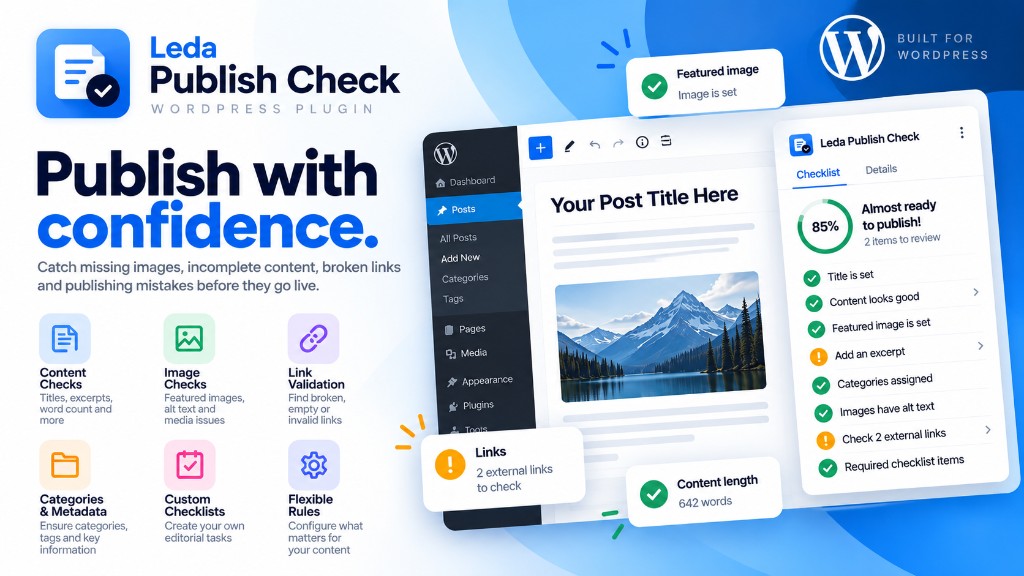
Leda Publish Check feature graphic for WordPress

A checklist that sits with your WordPress workflow

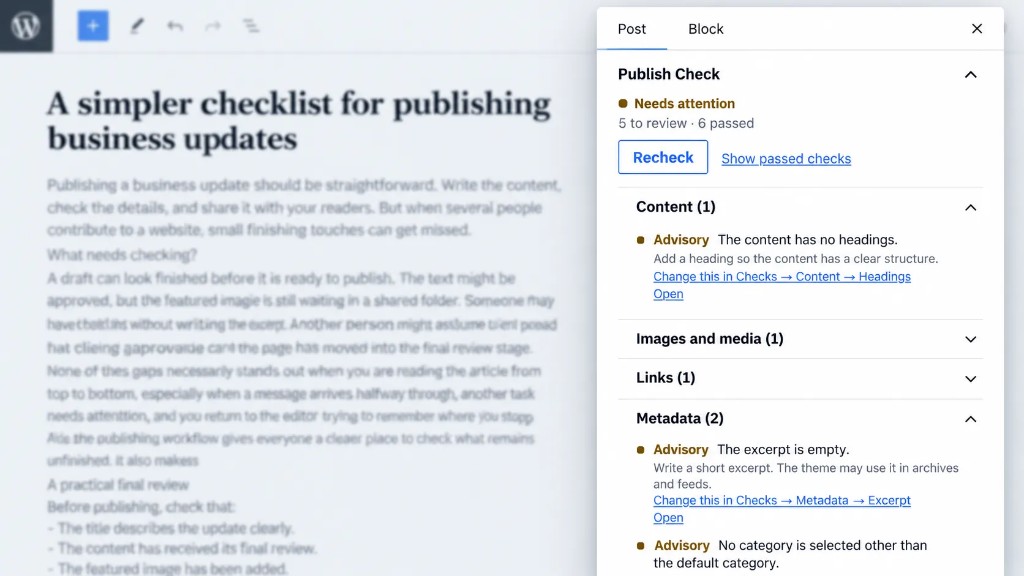
Leda Publish Check overview graphic

Benefits

Catch issues early

Spot missing titles, empty content, weak media and link problems before publish.

Fit your workflow

Configure rules for different post types, with advisory guidance by default.

Help editors finish

Custom checklists keep solo writers and content teams aligned on what still needs doing.

Stay local to WordPress

Built to run inside your site without external accounts or subscriptions.

Capabilities

Content quality checks

  • Missing titles
  • Empty content
  • Missing excerpts
  • Word count requirements
  • Heading structure problems
  • Long paragraphs
  • Duplicate titles
  • Required or prohibited phrases

Image and media checks

  • Missing featured images
  • Missing image alternative text
  • Broken or missing media references
  • Featured images outside configured dimensions

Link validation

  • Empty links
  • Malformed URLs
  • Missing internal pages
  • Potentially broken external links, when enabled

Categories and metadata

  • Categories, tags and custom taxonomies
  • Slugs and excerpts
  • Required custom fields

Custom editorial checklists

  • Administrators can create custom editorial tasks
  • Editors can complete tasks before publishing
  • Useful for individual bloggers and content teams

Configurable publishing rules

  • Enable or disable checks
  • Configure thresholds
  • Set advisory or mandatory requirements
  • Apply different rules to different post types
  • Decide which issues should prevent publication
  • Advisory by default unless mandatory rules are set

WordPress editor integration

  • Gutenberg checklist panel
  • Publishing readiness summary
  • Clear warnings and actionable feedback
  • Live content checks
  • Classic Editor support
  • Readiness cues in content administration lists

Privacy and performance

  • Designed to operate locally within WordPress
  • No external accounts, analytics services or subscriptions required
  • Lightweight operation and secure data handling
  • Compatibility with standard WordPress installations

How it works

  1. 01

    Configure rules

    Choose which checks matter for each post type, and whether they advise or block.

  2. 02

    Write content

    Work in Gutenberg or Classic Editor as usual while checks run alongside the draft.

  3. 03

    Review findings

    See a clear readiness summary with warnings editors can act on.

  4. 04

    Publish

    Release when the checklist is satisfied, with fewer last-minute surprises.

Who it is for

  • Bloggers who want a final quality pass before posts go live
  • Business sites that publish updates, news or resources regularly
  • Editors and content teams who share publishing standards
  • Agencies and publishers who manage many WordPress sites

Questions

What does Leda Publish Check review before publishing?

It helps review content quality, media, links, categories and metadata, plus optional custom editorial checklist items, so common publishing gaps are visible before a post goes live.

Can I customise the publishing checklist?

Yes. You can enable or disable checks, set thresholds, choose advisory or mandatory rules, and apply different rules to different post types.

Does it work with the WordPress block editor?

Yes. It is designed for Gutenberg with a checklist panel and readiness summary, and it also supports Classic Editor workflows.

How do I get the plugin?

Leda Publish Check is available upon request from Bez Leda Studios. Use the request form and we will confirm the next steps for your site.

Ready to publish with more confidence? Request Leda Publish Check.

Request This Plugin

Developed by Bez Leda Studios.